
An Example How Nuutti
Works
Step
1: Create a background scene
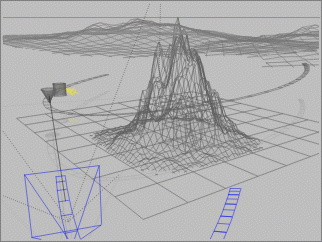
In this example a background
scene is created in Bryce. Some mountains, a sky etc.. In addition to background
the primary objects: a spaceship, it's spotlight and the paths they use are
also created. The spaceships in Bryce is just a cylinder object set to follow
(or point at) a dummy hidden cone object. The light is parented to the cylinder
but points at a dummy box object in the mountain. Camera has it's own path
but points at the dummy cone.
Step
2: All paths and object positions are recorded by Nuutti
When scene is ready Nuutti
records all positions in time and 3D space of needed objects in the scene.
Then the scene is rendered in Bryce. In this example a mountain scene with
a slight is rendered - no spaceships or other effects.
Step
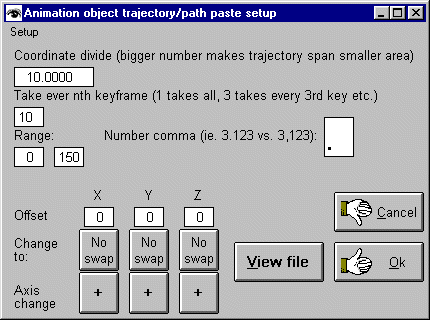
3: Nuutti creates/imports all
paths and object positions to LightWave
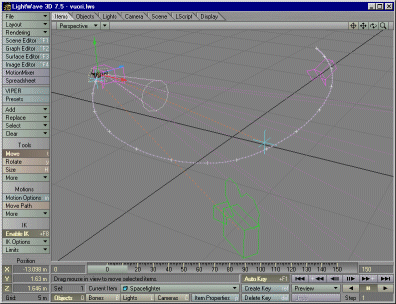
In this example Nuutti
creates all objects positions and their paths to LightWave 7. 3DS Max, Carrara,
Cinema4DXL or TrueSpace could have been used as well. The background is set
to use the AVI or BMP sequence rendered in Step 2. A spaceship is set to follow
a path created/imported by Nuutti. Light is targeted at Nuutti imported path
of a null object. Camera follows an imported path. Since all motion matches
the background a seamless motion controlled scene is created. Check out the
animation here.
LightWave, 3DS Max, Bryce, TrueSpace, Carrara and Cinema 4DXL are registered trademark of belonging to their respective owners.
Price:
USD
$49.95
Price includes shipping costs.
Free upgrades for 6 months.
Minimum requirements:
Windows 95, 98, NT, Me, 2000, XP or later compatible system.
Pay using PayPal creditcard
system
Other payment options:
click here for details.